Wednesday, 21 August 2013

Monday, 10 June 2013
Node.js and real-time applications
Hey there guys , posting after a long long time . Was a bit busy and stuff .
So let's talk about node.js . What is node.js ? It is a server-side software system that can be used to write scalable web applications . As the name suggests , all the code is basically written in javascript .
So what makes node stand out from conventional server side solutions such as php/jsp or other such stuff ? The main advantage of using node.js is it's advanced push capability . That is server can push information to the client in real time , whenever there is a change in the web page or new content is added which means it enables persistent connection between your page and the web server . Node.js uses a non-blocking event driven I/O . In node each persistent connection won't block other requests .Other languages like php sets up a new server process for each connection and we might end up with using a lot of cpu resources . Thus nodejs is suitable for handling many persistent connections at once without using up a huge amount of resources .
To get the best out of node , use Socket.IO and redis . So what is socket.io ? Socket.IO enables you to broadcast data to clients based on a certain event . It uses websockets protocol primarily if present , but it can use other methods too like Adobe flash sockets , JSONP polling , ajax , long polling . It allows us to have almost "instant" feedback from the server . Redis is a in-memory , key:value store . Redis supports abstract data types like hashes , sets and lists . Also the pub-sub system allows you to subscribe to messages from a certain channel and so on which can be used for notification systems , chat rooms and so on.
So let's talk about node.js . What is node.js ? It is a server-side software system that can be used to write scalable web applications . As the name suggests , all the code is basically written in javascript .
So what makes node stand out from conventional server side solutions such as php/jsp or other such stuff ? The main advantage of using node.js is it's advanced push capability . That is server can push information to the client in real time , whenever there is a change in the web page or new content is added which means it enables persistent connection between your page and the web server . Node.js uses a non-blocking event driven I/O . In node each persistent connection won't block other requests .Other languages like php sets up a new server process for each connection and we might end up with using a lot of cpu resources . Thus nodejs is suitable for handling many persistent connections at once without using up a huge amount of resources .
To get the best out of node , use Socket.IO and redis . So what is socket.io ? Socket.IO enables you to broadcast data to clients based on a certain event . It uses websockets protocol primarily if present , but it can use other methods too like Adobe flash sockets , JSONP polling , ajax , long polling . It allows us to have almost "instant" feedback from the server . Redis is a in-memory , key:value store . Redis supports abstract data types like hashes , sets and lists . Also the pub-sub system allows you to subscribe to messages from a certain channel and so on which can be used for notification systems , chat rooms and so on.
Saturday, 30 March 2013
Denying access to a particular folder on your web server
Suppose you have a directory in your web server which contains sensitive files like files containing database connection passwords , app-secret id's for using 3rd party services etc . You want to block access to that particular folder . So how are you going to do it ? Well it's pretty simple . Just add a .htaccess file to that folder . Open it up , and add the following lines :-
Order deny,allow
deny from all
This will deny access to any files in that folder . Remember that all those files in the folder can be accessed only if you add a require , include directive in a file on the server-side . However ajax calls or any sort of client request won't work on the files of that directory .
Order deny,allow
deny from all
This will deny access to any files in that folder . Remember that all those files in the folder can be accessed only if you add a require , include directive in a file on the server-side . However ajax calls or any sort of client request won't work on the files of that directory .
Friday, 29 March 2013
PHP Tutorial . Chapter 5 . PHP Control Statements ( Part 2 - Loops 1 (For Loop) )
While writing your code , you might encounter situations when you might want to execute the same set of statements over and over again . PHP like other programming languages implements this in the form of loops . There are three types of looping constructs commonly used in php - for , while , foreach . The last one is usually used for resources , associative arrays .
1) For Loop
The following piece of code illustrates the use of a for loop .
for($i=1 ; $i<=10 ; $i++)
{
echo $i."<b/>";
}
The above code will print 1 to 10 on different lines . So how does this work ? First we assign $i = 1 . Then when the loop executes each time , the condition $i<=10 . The statements inside the looping construct are executed only if this condition is true . Then the value of the variable i is incremented .
The given code can also be written as the following . It is an example of a loop where no statements are within the control statement itself . We assign the variable out of the loop and also the conditions are checked for and the variable is incremented inside the loop .
$i=1;
for(;;)
{
echo $i++."<br/>";
if($i>10)
break;
}
The only thing that may sound unfamiliar to guys who are new to programming is the break statement . Whenever a break statement is encountered , the loop is terminated then and there . There is also something called continue , which is the opposite of break , continue ends the loop over there and starts a new loop .
1) For Loop
The following piece of code illustrates the use of a for loop .
for($i=1 ; $i<=10 ; $i++)
{
echo $i."<b/>";
}
The above code will print 1 to 10 on different lines . So how does this work ? First we assign $i = 1 . Then when the loop executes each time , the condition $i<=10 . The statements inside the looping construct are executed only if this condition is true . Then the value of the variable i is incremented .
The given code can also be written as the following . It is an example of a loop where no statements are within the control statement itself . We assign the variable out of the loop and also the conditions are checked for and the variable is incremented inside the loop .
$i=1;
for(;;)
{
echo $i++."<br/>";
if($i>10)
break;
}
The only thing that may sound unfamiliar to guys who are new to programming is the break statement . Whenever a break statement is encountered , the loop is terminated then and there . There is also something called continue , which is the opposite of break , continue ends the loop over there and starts a new loop .
Saturday, 23 March 2013
Off the grid ...
Hello guys :) I am posting after a long time , it may be yet another couple of weeks until i can get back to blogging regularly , owing to exams/competitions etc etc . Please bear with me :) I Promise to be back with nice tutes and awesome hacks !! Till then cya :) Bye !!
Wednesday, 27 February 2013
Working with XML in PHP
Hey guys !! Writing an article after a long long time !! Been a month since i last wrote an article (courtesy mid semester exams) . So today i will give you a basic intro as to how you will load an xml file in php and add stuff to it . It's applications ? Well you may have a sitemap which is to be uploaded in real time as more links are added to your website . Or say you want to store data in xml format and would make an ajax call to the file etc .

Example of a sitemap.xml file :-
<?xml version="1.0" encoding="UTF-8"?>
<urlset xmlns="http://www.sitemaps.org/schemas/sitemap/0.9">
<url>localhost/account/id/nraider0207</url>
<url>localhost/account/id/anuragdas</url>
</urlset>
So how can you open up and edit an XML File ?Example of a sitemap.xml file :-
<?xml version="1.0" encoding="UTF-8"?>
<urlset xmlns="http://www.sitemaps.org/schemas/sitemap/0.9">
<url>localhost/account/id/nraider0207</url>
<url>localhost/account/id/anuragdas</url>
</urlset>
Consider the following fragment of code :
$xml = new DOMDocument();
$xml->load("C:\wamp\www\phpweb20\public\sitemap\sitemap.xml");
$root = $xml->firstChild;
$newElem = $xml->createElement('url');
$root->appendChild($newElem);
$txt = $xml->createTextNode("http://localhost/account/id/example");
$newElem->appendChild($txt);
$xml->save("C:\wamp\www\phpweb20\public\sitemap\sitemap.xml");
Let us consider the fragment of code line by line :
The first line creates a new object , which might be used to represent an entire HTML/XML document . Since both xml and html semantics are identical , so this can be used for creating/editing html too . The next line will load the file as given by the location . The next line selects the first child of the document root (since we specified $xml as document root in the first line , if you pass along any other element , the first child of that element will be selected) . In the example i cited above the element
Sunday, 3 February 2013
PHP Tutorial . Chapter 5 . PHP Control Statements (Part 1 if-else statement)
What fun is programming if you don't have control over the code ? Best coding practices include writing code that responds differently to different situations . Suppose you have a code let's say , which takes in the type of an employee in an office and accordingly outputs the salary for that position , lets say , what would you do ?
( Cookies again for C Programmers , this section is actually same as the if-else you were accustomed to before !! )
The most popular control statement in any programming language is the if-else construct . So how to use the if else construct ? Let's follow the following example and things will seem pretty easy then .
Algorithm :
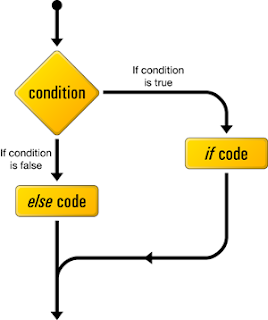
Example
Lets say that we have a variable that stores the type of an employee at an office . We will check that variable and print out the corresponding salary .
$a = "General Manager";
if($a=="General Manager")
echo "1000000";
else if($a=="CEO")
echo "2000000";
else if($a=="Chairman")
echo "3000000";
?>
The above code outputs 1000000 .
Also an important aspect of php code is that it continues from the last block . Suppose you have a file containing both php and html . You have a block of php code , then you have some html and then again a block of php code , php will continue from the last line of the previous block . This will be clear from the following example .
Example
$a = 5 ;
if($a==5)
{
echo "The number is equal to 5
";
$a++;
echo "Now it's value is :- ".$a."
";
}
else if($a>5)
{
?>
( Cookies again for C Programmers , this section is actually same as the if-else you were accustomed to before !! )
The most popular control statement in any programming language is the if-else construct . So how to use the if else construct ? Let's follow the following example and things will seem pretty easy then .
Algorithm :

Example
Lets say that we have a variable that stores the type of an employee at an office . We will check that variable and print out the corresponding salary .
$a = "General Manager";
if($a=="General Manager")
echo "1000000";
else if($a=="CEO")
echo "2000000";
else if($a=="Chairman")
echo "3000000";
?>
The above code outputs 1000000 .
Also an important aspect of php code is that it continues from the last block . Suppose you have a file containing both php and html . You have a block of php code , then you have some html and then again a block of php code , php will continue from the last line of the previous block . This will be clear from the following example .
Example
$a = 5 ;
if($a==5)
{
echo "The number is equal to 5
";
$a++;
echo "Now it's value is :- ".$a."
";
}
else if($a>5)
{
?>
echo "The number is greater than 5
";
echo "Also this statement is in the second php block
";
}
else
{
echo "The number is lesser than 5
";
echo "Also this statement is in the second php block
";
}
?>
This code won't show any error even though the else-if block is spread across the two blocks . This is quite a flexible feature !! It comes in handy if you want to place some html code within the conditions or within an incomplete block .
Friday, 1 February 2013
Chapter 4 . Output (echo and print statements)
Obviously you guys don't want to write php code which does not output anything !! That's why you're here !! Today i'll cover some of the basic output methods in php . I will cover two of the most basic output methods today , and i will introduce you to some advanced output methods which we'll cover later on .
ECHO
Firstly the command which i use the most (okay i'm being partial) , ECHO , the echo command can be used in any one of the following ways :-
echo "This is the text that'll be printed !! ";
echo("This is the text that'll be printed");
echo "This is the text "."that'll be printed" ; // The . joins the two strings and prints them
You can also use commas in the echo without parenthesis :-
echo "This is the text","that'll be printed";
However you can't use commas in the one with parenthesis .
If you want to print variables , you can do it in the following way :-
echo $a;
echo "The value of a is :- ".$a;
echo "The value of a is {$a}";
However if you use single quotes in the last statement , the sentence will be printed as it is without the $a being substituted by the value it's holding .
PRINT
So what's the basic difference between print and echo ? Well as we saw that echo can take multiple arguments or strings and output them together . However that is not so in case of print . In this case you can have only one argument . Also print returns a value which can be used to determine whether the print statement succeeded or not .
Eg :-
print("Hello World !!");
print($a);
Other methods :- There are other advanced methods like print_r() -> Used to print out the array details or var_dump() -> Used to print out the object details , i'll cover these when i cover the respective chapters on array and objects !!
ECHO
Firstly the command which i use the most (okay i'm being partial) , ECHO , the echo command can be used in any one of the following ways :-
echo "This is the text that'll be printed !! ";
echo("This is the text that'll be printed");
echo "This is the text "."that'll be printed" ; // The . joins the two strings and prints them
You can also use commas in the echo without parenthesis :-
echo "This is the text","that'll be printed";
However you can't use commas in the one with parenthesis .
If you want to print variables , you can do it in the following way :-
echo $a;
echo "The value of a is :- ".$a;
echo "The value of a is {$a}";
However if you use single quotes in the last statement , the sentence will be printed as it is without the $a being substituted by the value it's holding .
So what's the basic difference between print and echo ? Well as we saw that echo can take multiple arguments or strings and output them together . However that is not so in case of print . In this case you can have only one argument . Also print returns a value which can be used to determine whether the print statement succeeded or not .
Eg :-
print("Hello World !!");
print($a);
Other methods :- There are other advanced methods like print_r() -> Used to print out the array details or var_dump() -> Used to print out the object details , i'll cover these when i cover the respective chapters on array and objects !!
Wednesday, 30 January 2013
PHP Tutorial . Chapter 3 . Comments
Knowing certain commands , implementing them in your code is one thing , but making your code more organised , more readable to others so that when you work in a team , others should have a rough idea of what your variables and member functions are upto . And for that including comments in your code is a very good idea . You don't know who else might be working on your code so it is a very good idea to convey what your program does through comments . C/c++ coders will be happy to know that commenting works the same way in both of them . Others , chillax , grab a cup of coffee and just follow the examples :-
Single Line Comment :-
$a = 5 ; //This is an example of single line comment.
$b = 6; #Another example of single line comment
For a single line comment , you have to give two slashes followed by your comment .
Multi-line Comment :-
$c = 9 ; /* This is an example of multi-line comment
2nd line....
3rd line ...
and so on ...
........ */
Remember one thing , you cannot nest multi-line comments like :-
$d= "epic-fail"; /* This /* is
not */correct*/
The word "correct" will be interpreted as a part of the code . So be careful !!
Single Line Comment :-
$a = 5 ; //This is an example of single line comment.
$b = 6; #Another example of single line comment
For a single line comment , you have to give two slashes followed by your comment .
Multi-line Comment :-
$c = 9 ; /* This is an example of multi-line comment
2nd line....
3rd line ...
and so on ...
........ */
Remember one thing , you cannot nest multi-line comments like :-
$d= "epic-fail"; /* This /* is
not */correct*/
The word "correct" will be interpreted as a part of the code . So be careful !!
Tuesday, 29 January 2013
When to use double quotes and single quotes in php ?
The answer is really simple , if you want to put something in a sentence exactly the way it is , use single string , if u want php to do some processing (identifying the variables etc.) use double quotes . Using single quotes you want be able to reference a variable inside it since php will treat the entire stuff in between the single quotes as a string . But it is not so in case of double quotes !! In case of double quotes php will actually do some processing on it's own and see whether any variables are present inside it and will replace them with their values . Consider the following example :-
$var = "Sample Text !!";
echo '$var'; //Outputs $var
echo "$var"; //Outputs Sample Text!!
?>
Now does that mean we should use double quotes always ? NO !! You must be wondering why ? Well , it's obvious that double quotes will require some more overhead since it does processing , so it will take some more time than single quotes . If there is a single line to be printed or so then this is not an issue , but suppose you have a loop that iterates a million times , what then ? It will be that extra time multiplied by a million !!
Suppose you have something inside the loop which is as follows :-
echo "Item Number :- $item";
Then write it as :-
echo 'Item Number :-'.$item;
In case of larger iterations this method should work more quickly than the previous one !!
$var = "Sample Text !!";
echo '$var'; //Outputs $var
echo "$var"; //Outputs Sample Text!!
?>
Now does that mean we should use double quotes always ? NO !! You must be wondering why ? Well , it's obvious that double quotes will require some more overhead since it does processing , so it will take some more time than single quotes . If there is a single line to be printed or so then this is not an issue , but suppose you have a loop that iterates a million times , what then ? It will be that extra time multiplied by a million !!
Suppose you have something inside the loop which is as follows :-
echo "Item Number :- $item";
Then write it as :-
echo 'Item Number :-'.$item;
In case of larger iterations this method should work more quickly than the previous one !!
Monday, 28 January 2013
Php this keyword
Today i am going to familiarize you guys with the $this keyword in php . So what does $this do ? Essentially it is used to access member variables from inside a member function in a class .
Consider the following example :-
class webdevfunda
{
public $var;
private $_var;
public function foo()
{
$this->var = 2;
$this->_var = 3;
}
}
class phptute extends webdevfunda
{
public function zoo()
{
$this->var =4;
$this->_var=6; //Will produce an error
}
}
Note that when zoo tries to access _var it produces an error . This is because zoo is trying to access a private variable of it's parent class which it does not have access to . So it produces an error . In case of a function we can use the self::function_name(); command to invoke the function .
Consider the following example :-
class webdevfunda
{
public $var;
private $_var;
public function foo()
{
$this->var = 2;
$this->_var = 3;
}
}
class phptute extends webdevfunda
{
public function zoo()
{
$this->var =4;
$this->_var=6; //Will produce an error
}
}
Note that when zoo tries to access _var it produces an error . This is because zoo is trying to access a private variable of it's parent class which it does not have access to . So it produces an error . In case of a function we can use the self::function_name(); command to invoke the function .
PHP Tutorial : Chapter 2 . Variables and Syntax (Part 3)
Integers and Doubles contd.
Numbers can be assigned to variable in any of the three formats :-
1) Decimal
2) Octal
3) Hexadecimal
Decimal is the default format , to assign a number in octal the octal value should be preceded by a leading 0 , and to assign a number in hexadecimal , the number should be assigned with a leading 0x . The following example assigns the value 4 in decimal , octal and hexadecimal .
$a = 4;
$b = 04;
$c = 0x4;
The largest integer that can be assigned to a variable is 2^31 - 1 and the smallest integer is -(2^31-1) .
Keep in mind that double added to an integer will always yield a double . And doubles print with as minimum places after the decimal as possible . For example 3.645+0.055 will yield 3.7 and not 3.700 .
Booleans
Booleans can attain the value true or false . Howerver how will you determine which constant gives what boolean value ?
Suppose we have something like this :-
if($x)
{
//Perform Something
}
$x might not necessarily contain a boolean value , however the expression inside if will be cast into a boolean value during the execution of the code . So what are the rules followed during such a casting ?
a) Remember that a NULL value evaluates to false .
b) Empty string,array evaluates to false .
c) Any numeric value evaluates to false .
Also i will come to variables holding resources and so on while covering databases afterwards . For now just remember that a variable holding a "failed" value such as a failed database connection , or failed socket connection holds a false value in most of the cases . However it may depend on the situation .
Numbers can be assigned to variable in any of the three formats :-
1) Decimal
2) Octal
3) Hexadecimal
Decimal is the default format , to assign a number in octal the octal value should be preceded by a leading 0 , and to assign a number in hexadecimal , the number should be assigned with a leading 0x . The following example assigns the value 4 in decimal , octal and hexadecimal .
$a = 4;
$b = 04;
$c = 0x4;
The largest integer that can be assigned to a variable is 2^31 - 1 and the smallest integer is -(2^31-1) .
Keep in mind that double added to an integer will always yield a double . And doubles print with as minimum places after the decimal as possible . For example 3.645+0.055 will yield 3.7 and not 3.700 .
Booleans
Booleans can attain the value true or false . Howerver how will you determine which constant gives what boolean value ?
Suppose we have something like this :-
if($x)
{
//Perform Something
}
$x might not necessarily contain a boolean value , however the expression inside if will be cast into a boolean value during the execution of the code . So what are the rules followed during such a casting ?
a) Remember that a NULL value evaluates to false .
b) Empty string,array evaluates to false .
c) Any numeric value evaluates to false .
Also i will come to variables holding resources and so on while covering databases afterwards . For now just remember that a variable holding a "failed" value such as a failed database connection , or failed socket connection holds a false value in most of the cases . However it may depend on the situation .
Sunday, 27 January 2013
PHP Tutorial : Chapter 2 . PHP Syntax and variables (Part 2)
Suppose you have an expression like the following :-
$a = (9+5)*8/2+3-1*2+7 ;
S what will the expression evaluate to ? While evaluating , it should be kept in mind , that evaluation of expression occurs just like in normal mathematics , i.e. , first the expression within brackets are evaluated then division takes place , after that multiplication , followed by addition and ultimately subtraction . What happens in case the operators have same precedence ? Consider the following example :-
$a = 8.0/2.0/4.0 ;
In this case always remember that , the operations will be carried out from left to right . The expression will have a value of 1.0 and not 16.0 .
----------------------------------------------------------------------------------
To do Create an sample.php file in the following directory C:/wamp/www (the directory may differ based on where you installed wamp) , in case of linux go to /var/www and put the file in there . Now open the file with a text editor and key in the following :-
< html >
< head >
< title > Welcome to my first PHP Program < /title >
< /head >
< body >
< ?php
$a = (19+17)/(3*4)/(3) ;
echo $a ; // Echo takes a string as input and outputs it to the file
? >
< /body >
< /html >
First evaluate the expression yourself and check whether it tallies with the output . To run the file , open up a browser , and type localhost/sample.php .
----------------------------------------------------------------------------------
PHP offers us the following variable types :-
1) Integers . Eg:- 1,-1,0,2,6,-178 and so on
2) Doubles (Numbers with a decimal point) . Eg:- 1.78 , 3.9461 etc
3) Booleans , which can have only two values TRUE and FALSE .
4) NULL is a special type having only one value NULL (i.e., no value)
5) Strings , sequences of characters . E.g :- "This is a string"
6) Arrays , holds a collection of other values . E.g :- $a = array(1,2,"apple",TRUE);
7) Objects , instances of a class (Don't worry i'll explain this in much more detail later on)
8) Resources , variables holding stuff like database connection or stuff like that .
One should keep the following in mind about php variables :-
a) No explicit type declaration is required . For the ones who have programmed in other languages before you must have come across keywords like int,float while defining a variable . Well those are not required over here .
b) Automatic type conversion . PHP automatically converts type as and when required . For eg :-
$c = 3 + 0.14 ; will be evaluated to a double variable .
c) PHP assigns type depending on the situation . For example :-
$sub = substr (45981,2,3);
Substr is a function which extracts a string from another string where the string is the first input , and the next two inputs are the starting point and length of the string to be extracted . However in this case we gave a number so that should give us an error !! However php treats even that number as a string , and we have the output 981 . Thus php does type conversion based on the situation it is in , making it more flexible than other languages !!
$a = (9+5)*8/2+3-1*2+7 ;
S what will the expression evaluate to ? While evaluating , it should be kept in mind , that evaluation of expression occurs just like in normal mathematics , i.e. , first the expression within brackets are evaluated then division takes place , after that multiplication , followed by addition and ultimately subtraction . What happens in case the operators have same precedence ? Consider the following example :-
$a = 8.0/2.0/4.0 ;
In this case always remember that , the operations will be carried out from left to right . The expression will have a value of 1.0 and not 16.0 .
----------------------------------------------------------------------------------
To do Create an sample.php file in the following directory C:/wamp/www (the directory may differ based on where you installed wamp) , in case of linux go to /var/www and put the file in there . Now open the file with a text editor and key in the following :-
< html >
< head >
< title > Welcome to my first PHP Program < /title >
< /head >
< body >
< ?php
$a = (19+17)/(3*4)/(3) ;
echo $a ; // Echo takes a string as input and outputs it to the file
? >
< /body >
< /html >
First evaluate the expression yourself and check whether it tallies with the output . To run the file , open up a browser , and type localhost/sample.php .
----------------------------------------------------------------------------------
PHP offers us the following variable types :-
1) Integers . Eg:- 1,-1,0,2,6,-178 and so on
2) Doubles (Numbers with a decimal point) . Eg:- 1.78 , 3.9461 etc
3) Booleans , which can have only two values TRUE and FALSE .
4) NULL is a special type having only one value NULL (i.e., no value)
5) Strings , sequences of characters . E.g :- "This is a string"
6) Arrays , holds a collection of other values . E.g :- $a = array(1,2,"apple",TRUE);
7) Objects , instances of a class (Don't worry i'll explain this in much more detail later on)
8) Resources , variables holding stuff like database connection or stuff like that .
One should keep the following in mind about php variables :-
a) No explicit type declaration is required . For the ones who have programmed in other languages before you must have come across keywords like int,float while defining a variable . Well those are not required over here .
b) Automatic type conversion . PHP automatically converts type as and when required . For eg :-
$c = 3 + 0.14 ; will be evaluated to a double variable .
c) PHP assigns type depending on the situation . For example :-
$sub = substr (45981,2,3);
Substr is a function which extracts a string from another string where the string is the first input , and the next two inputs are the starting point and length of the string to be extracted . However in this case we gave a number so that should give us an error !! However php treats even that number as a string , and we have the output 981 . Thus php does type conversion based on the situation it is in , making it more flexible than other languages !!
Saturday, 26 January 2013
PHP Tutorial : Chapter 2 . PHP Syntax and variables (Part 1)
Firstly let me mention something :- Cookies for you c/c++/java programmers or anyone with prior coding experience , for php will seem just like a walk in the park to you guys !! For others or for first timers , don't worry , PHP is well , rather easy !!
We assign variables in php , in the following manner :-
$var = 1 ;
$str ="This is a string" ;
or just simply :-
$var ;
Confused c/c++/java programmers ? No int , no float , in other words no type declaration ? Well php does not need any type declaration , it's done automatically !!
The following things should be kept in mind about php's syntax :-
1) It is case-sensitive .
2) All statements should end in semi-colon .
3) White spaces are not taken into consideration . For eg :- $x= 2 + 2 ; is the same as $x=2+2;
We assign variables in php , in the following manner :-
$var = 1 ;
$str ="This is a string" ;
or just simply :-
$var ;
Confused c/c++/java programmers ? No int , no float , in other words no type declaration ? Well php does not need any type declaration , it's done automatically !!
The following things should be kept in mind about php's syntax :-
1) It is case-sensitive .
2) All statements should end in semi-colon .
3) White spaces are not taken into consideration . For eg :- $x= 2 + 2 ; is the same as $x=2+2;
Php Tutorial : Chapter 1 . Introduction to PHP
What is PHP ? PHP (PHP Hypertext Preprocessor) is an open source server side scripting language . So what is a server side scripting language ? You must have seen some html/css code before by examining the source code of various sides . Now some of these pages are static i.e no matter who the user is , the page will always show the same content . PHP along with some database solution helps us in making web pages dynamic i.e we can show the same page with different data to different users . Example :- Facebook profile page . The basic outlook of the page is the same for all users , however the data that needs to be displayed is different for different users !! Now this cannot be achieved by using traditional html/css . For this we need a server-side scripting solution and a database which will store all the user information . So basically what php does is , it produces the html which will be displayed in the client side . Note that unlike javascript , which can make changes to the page after the page has loaded in the user's browser , php can't make any changes once the page has been sent . This is the primary difference between a client side scripting language (javascript in this case) and a server side scripting language .
Why php and not any other server side scripting language ?
To install php :-
1) For windows :- Download the latest wamp package from here .
2) For linux (in ubuntu) : - Go to the shell and type sudo apt-get install lamp-server^
P.s. DO NOT miss out the ^ after lamp-server .
Why php and not any other server side scripting language ?
To install php :-
1) For windows :- Download the latest wamp package from here .
2) For linux (in ubuntu) : - Go to the shell and type sudo apt-get install lamp-server^
P.s. DO NOT miss out the ^ after lamp-server .
Thursday, 24 January 2013
Notification !! Beginner's corner !!
We'll launch a beginner's section soon !! There you can learn the very basics of web development !! We will post a new lesson everyday !! I apologize for the fact that i cannot upload the whole tutorial at one go due to time constraints . Nevertheless you'll find the tutorial interesting and informative . Please feel free to give suggestions . It'll be highly appreciated :)
Wednesday, 23 January 2013
Why use PHP ?
There are other server-side alternatives such as Ruby On Rails , JSP , ASP.Net etc , So why is php so popular or what are the advantages of php over other server side programming languages ?
Open Source :- Who likes free cookies ? Everyone !! Yes php is open source and comes for free !! Also if you've prior experience in programming languages like C,C++,Java , php is going to be a walk in the park for you !!
Cross platform/Platform independent :- PHP works across various operating systems . They are platform independent and can be used across various platforms . Version compatibility may be an issue sometimes , however most of the newer servers are back-compatible !!
Huge Number of communities :- So while i was in my initial days of web-development and just become familiar with the concepts of server side and client side , after doing some research i found out that the number of discussion forums , the number of communities of php out numbered those of any of it's other counterparts . So quite obviously , the more the fan following , more is the popularity . Seldom you'll find bugs in your code that hasn't been answered in any discussion forum or community !!
Number of good Frameworks :- It has a large number of good and open source frameworks which includes CakePHP,Zend Framework etc !! These frameworks have a lot of functionality built into them and it'll make life easier for you as a coder !!
Extensions :- Php has a lot of extensions available out there and therefore is extremely scalable !!
Open Source :- Who likes free cookies ? Everyone !! Yes php is open source and comes for free !! Also if you've prior experience in programming languages like C,C++,Java , php is going to be a walk in the park for you !!
Cross platform/Platform independent :- PHP works across various operating systems . They are platform independent and can be used across various platforms . Version compatibility may be an issue sometimes , however most of the newer servers are back-compatible !!
Huge Number of communities :- So while i was in my initial days of web-development and just become familiar with the concepts of server side and client side , after doing some research i found out that the number of discussion forums , the number of communities of php out numbered those of any of it's other counterparts . So quite obviously , the more the fan following , more is the popularity . Seldom you'll find bugs in your code that hasn't been answered in any discussion forum or community !!
Number of good Frameworks :- It has a large number of good and open source frameworks which includes CakePHP,Zend Framework etc !! These frameworks have a lot of functionality built into them and it'll make life easier for you as a coder !!
Extensions :- Php has a lot of extensions available out there and therefore is extremely scalable !!

Tuesday, 22 January 2013
Accessing Zend Services behind a proxy !!
Now i am going to share with you guys something that peeved me quite a bit !! I had been writting a small snippet of code which was utilizing Zend_Service_Amazon . I wrote all the code back at home , expecting it to work fine when i went back to my college , so i could finish writing the remaining portion over there . But as soon as i fired up my php script in the browser i started getting an error stating that there was no response received . At first i was confused , then after enabling the error stack trace option in zend , i found out that there was a problem with the client.php file inside zend_install_folder/library/Zend/Http/ .
To use web services behind proxy we need to find the following in the client.php file :-
"protected $config= ..." ,
In the array which is assigned to the config variable , add the following lines :-
'proxy_host'=>'YOUR_PROXY_HOST',
'proxy_port'=>'YOUR_PROXY_PORT'
and find 'adapter'=>'Zend_Http_Client_Adapter_Socket' ,
Change it to 'adapter'=>'Zend_Http_Client_Adapter_Proxy'
And you'r done !!
To use web services behind proxy we need to find the following in the client.php file :-
"protected $config= ..." ,
In the array which is assigned to the config variable , add the following lines :-
'proxy_host'=>'YOUR_PROXY_HOST',
'proxy_port'=>'YOUR_PROXY_PORT'
and find 'adapter'=>'Zend_Http_Client_Adapter_Socket' ,
Change it to 'adapter'=>'Zend_Http_Client_Adapter_Proxy'
And you'r done !!
Create a like button just like facebook !!
 |
| Facebook Like Button |
Hullo there guys , today i'm gonna give you a step by step tutorial for creating a like button using php/jquery , much like facebook !! So what is the general algorithm that is to be followed ? It's quite simple :-
When a user presses the like button two things should happen :- One , the number of likes should be updated in the database and two , the changes should be communicated to the the front-end that is the number of likes which all the other users are seeing , should be dynamically updated without affecting other page contents .
So how to acheive this ?
First create a mysql table called likes like the following :-
Item_Number | Likes
--------------------------
item number is the serial number for the item(post/image/link etc) for which the number of likes are stored in the corresponding column . Now create a php file with the following contents :-
Like.php (This file will give us the number of likes)
<?php
if(isset($_REQUEST['item_number']))
{
$x = $_REQUEST['item_number'] ;
$connection = mysql_connect("hostname","username","password");
$query = "SELECT * from database_name.likes WHERE Item_Number='{$x}' LIMIT 1";
$result = mysql_query($query);
$r = mysql_fetch_array($result);
echo $r["Likes"];
}
else if(isset($_REQUEST['add']))
{
$x = $_REQUEST['add'] ;
$connection = mysql_connect("hostname","username","password");
$query = "UPDATE Likes SET Likes=Likes+1 from database_name.likes WHERE Item_Number='{$x}'";
$result = mysql_query($query);
}
?>
Now , go to the file which will display the number of likes in real-time . suppose you want to display the number of likes in a div with an id "number_of_likes" , then the following jquery code will help you update the number of likes in real time :-
$(document).ready(function(){
setInterval(function(){
var item_number = 2 ; //say
var request_url = "Like.php?item_number="+item_number; //Build the request url
$.get(request_url,function(res){ $("#number_of_likes").html(res); })
},500)
//Other javascript/jquery code
$("#add").click(function(){
var item_number = 2 ; //say
var request_url = "Like.php?add="+item_number; //Build the request url
$.get(request_url,function(res){ $("#number_of_likes").html(res); })
})
});
So how does the code work ?
The setInterval function takes in two parameters , the function to be executed and the number of milliseconds after which it'll be executed again and again , so basically what it does is it runs the function at an interval of every 500 milli-seconds . So what does this function do ? The function basically fetches the contents of the file like.php?item_number=itemno after an interval of 500 milliseconds !! And what does Like.php contain ?? It contains the number of like sfor that particular item number !! So what does the script do then ? Yes it updates the number of likes every 0.5 seconds (1second = 1000 milli-second) , so eureka !! We're Done !!
The add button works in a similar way , just that we invoke it only when an user clicks the like button instead of repeating it !!
Creating the Buton
Just create a button and give it an id of "add" !!
Subscribe to:
Posts (Atom)